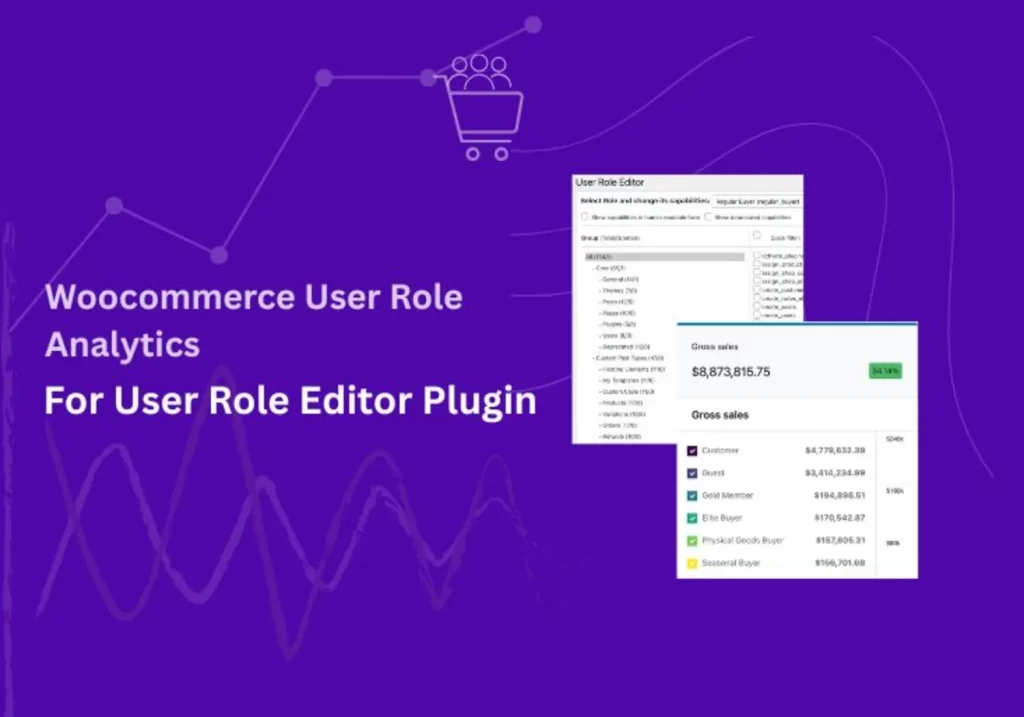
If you already use User Role Editor plugin to manage customer groups in WooCommerce, the Role-Based Analytics for WooCommerce extension adds powerful insights by introducing User Role filters across your Analytics. It creates a dedicated User Roles report page and extends filtering options to existing reports like Orders, Products, Categories etc, so you can track performance for each User Group (or User Roles) with precision.
Note: This article focuses on the integration between User Role Editor plugin and Role-Based Analytics for WooCommerce extention. However, Role-Based Analytics is designed to work with any plugin or extension that uses WordPress user roles — including membership, wholesale, and user-group-based solutions. If a plugin assigns roles to customers, those roles will automatically appear in your analytics reports.
Prerequisite: You must first purchase and activate Role-Based Analytics for WooCommerce (e.g. via WooCommerce.com) to enable these analytics features.
Turn Customer Group (User Role) Data into Actionable Insights
Creating customer groups (User Roles) with User Role Editor plugin helps you organize your WooCommerce store customer. The real value comes when you can see how each of those groups performs inside Analytics.
With role-based filtering, you can answer questions like:
- Which group contributes the most to sales?
- Do different groups purchase different products?
- How do groups respond to coupons or discounts compared to each other?
These insights turn raw data into opportunities:
- Focus marketing campaigns on the groups that drive the most value.
- Refine product strategies based on group behavior.
- Run promotions that match how each group actually shops.
- Grow revenue by aligning business decisions with customer data.
Instead of assumptions, you’ll have clear, role-based analytics to guide your marketing and sales strategies.
How Role-Based Analytics Works with User Role Editor plugin
User Role Editor helps you create custom roles (or customer groups) to organize your WooCommerce audience. Whether you call them groups, segments, or roles, the foundation is the same: WordPress user roles, which WooCommerce already understands.
This is exactly where Role-Based Analytics for WooCommerce steps in.
- It adds a dedicated User Roles report page inside WooCommerce Analytics.
- It recognizes all roles—both default WordPress roles and any custom ones created with the User Role Editor plugin.
- It automatically tracks sales data for customers assigned to each role.
- It even introduces a “Guest” role, which groups sales from unregistered customers so you can measure the impact of guest checkouts.
The result: instead of just knowing who your customer groups are, you can finally see how each role contributes to orders, products, and overall performance.
Example in Action
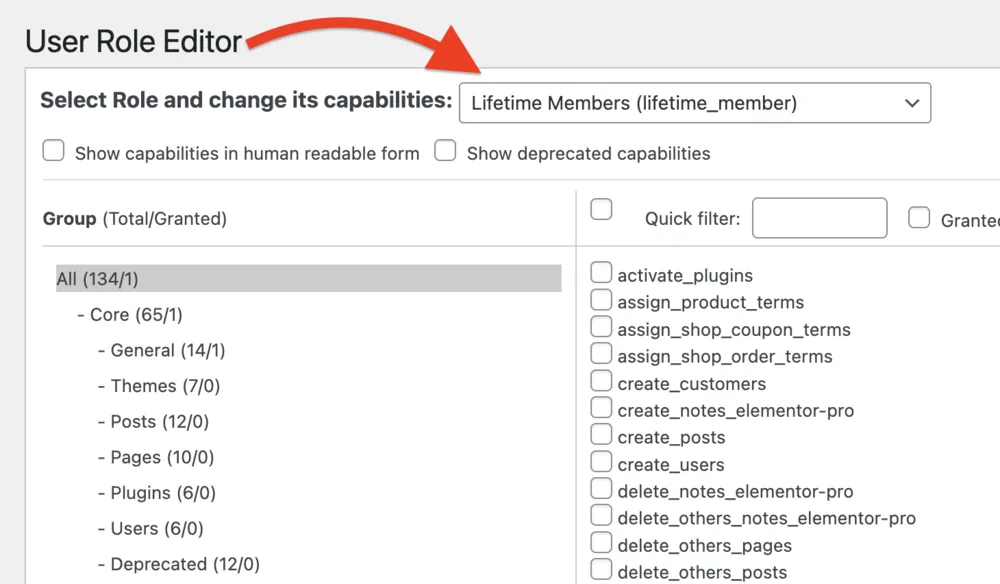
Let’s say you’ve created a custom User Role in the User Role Editor plugin called “Lifetime Members”, and you’ve assigned it to a customer who already has an order in your WooCommerce store.
When you open the User Roles Analytics report page, you’ll now see Lifetime Members listed alongside your other user roles. The report displays key metrics—such as order count, sales totals, and average order value—for this new role.
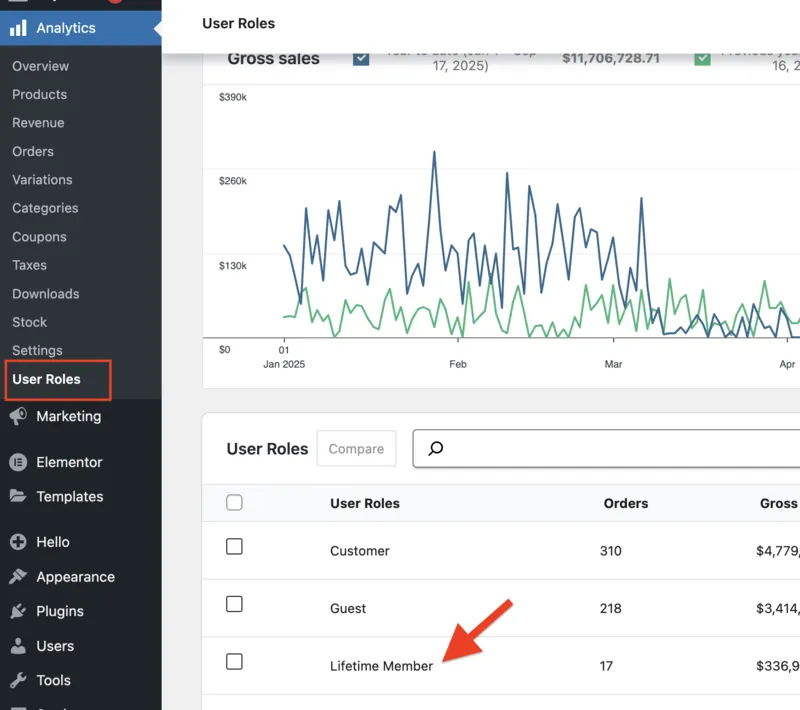
This shows how seamlessly Role-Based Analytics for WooCommerce pulls in both default roles and custom roles created with User Role Editor, giving you instant insights without extra setup.
How to Integrate User Role Analytics with User Role Editor plugin
We’ll assume you already use User Role Editor to manage and assign custom user roles in your WooCommerce store. The next step is to connect those roles with actionable insights inside WooCommerce Analytics using the Role-Based Analytics for WooCommerce extension.
Here’s how the integration works in practice:
Install Role-Based Analytics
Download and activate Role-Based Analytics for WooCommerce from the WooCommerce Marketplace.
Open Analytics Dashboard
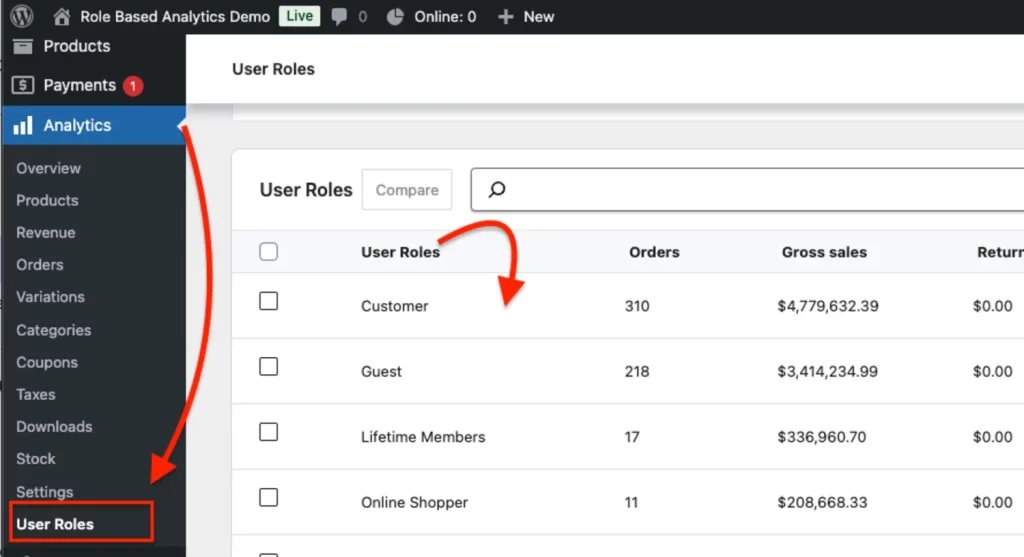
Go to Dashboard → Analytics → User Roles. You’ll now see a new User Roles report page alongside the default reports.
Apply User Role Filters
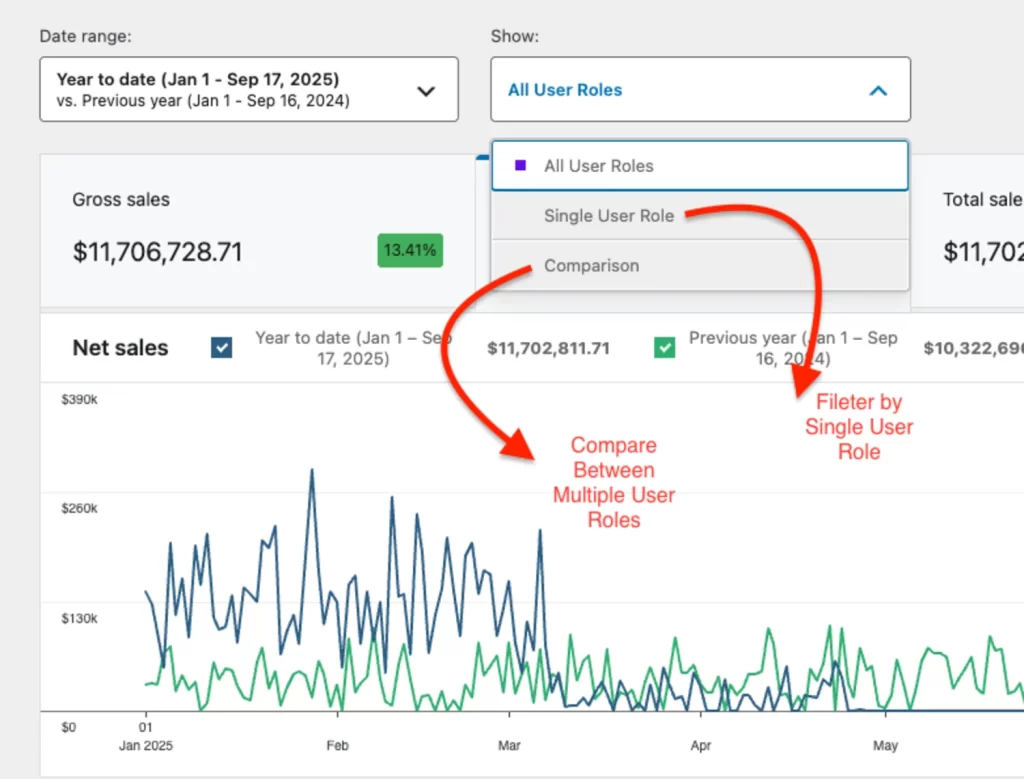
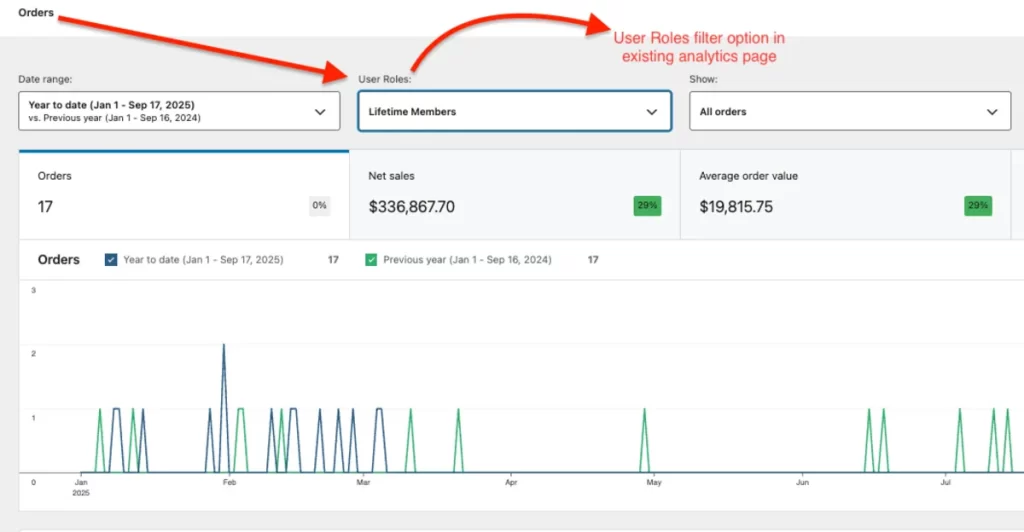
In both the new User Roles report and existing reports (Orders, Products, Categories, Coupons, Downloads), you’ll find a “Filter by User Role” dropdown. Select a single user role to view its performance or select multiple user roles to compare groups side by side.
Key Features of Role-Based Analytics for WooCommerce
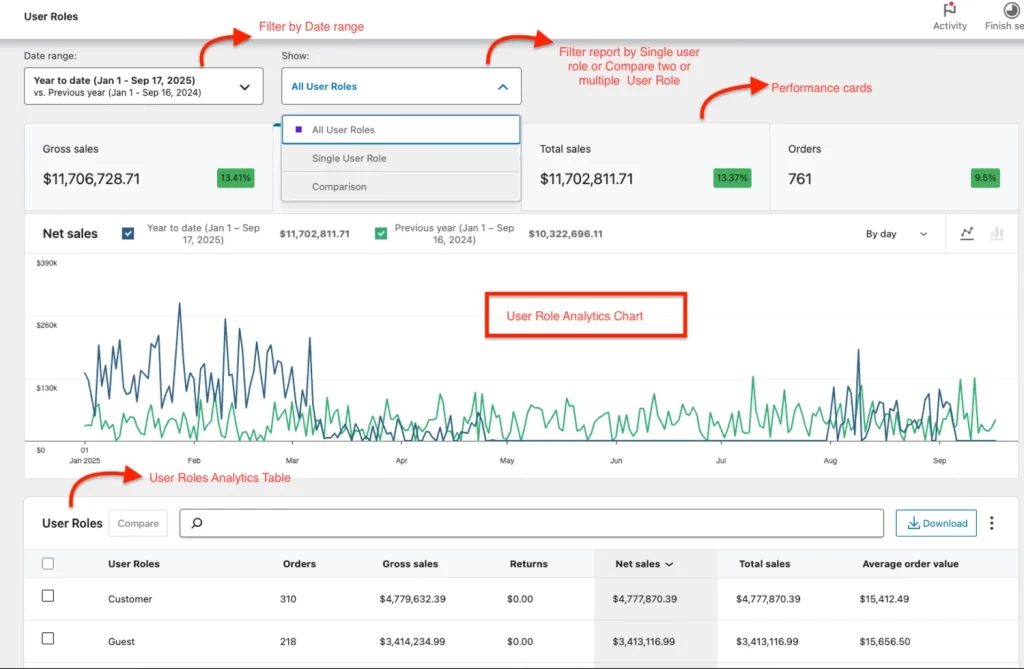
User Roles Report Page
The plugin introduces a dedicated User Roles report page inside WooCommerce Analytics.
- Filter by date range and by single or multiple user roles.
- Compare two or more user roles side by side.
- View insights in performance cards and charts for both time-based and user role comparisons.
- Explore a detailed user roles table showing: User Role, Order Count, Gross Sales, Returns, Net Sales, Total Sales, and Average Order Value.
- See a summary row that aggregates filtered user role data for quick reference.
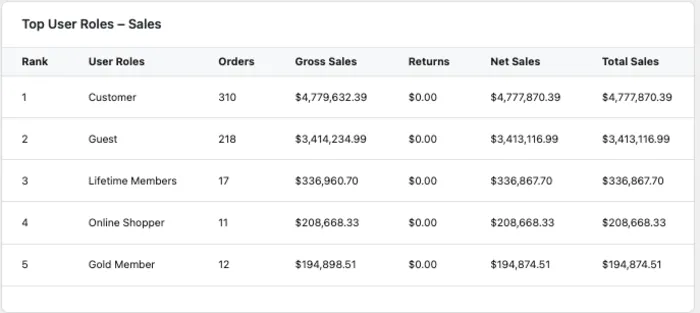
User Role Leaderboard in WooCommerce analytics Overview
Role-Based Analytics adds a user role leaderboard widget to the WooCommerce Analytics Overview page. This highlights the top-performing user roles, giving you at-a-glance insights into which groups drive the most sales.
User Role Filters in Existing WooCommerce Analytics Pages
Beyond the dedicated report page, the plugin extends User Role filtering to existing WooCommerce Analytics pages, including Orders, Products, Categories, Coupons and Downloads
This ensures you can segment virtually all your store’s analytics by user role.
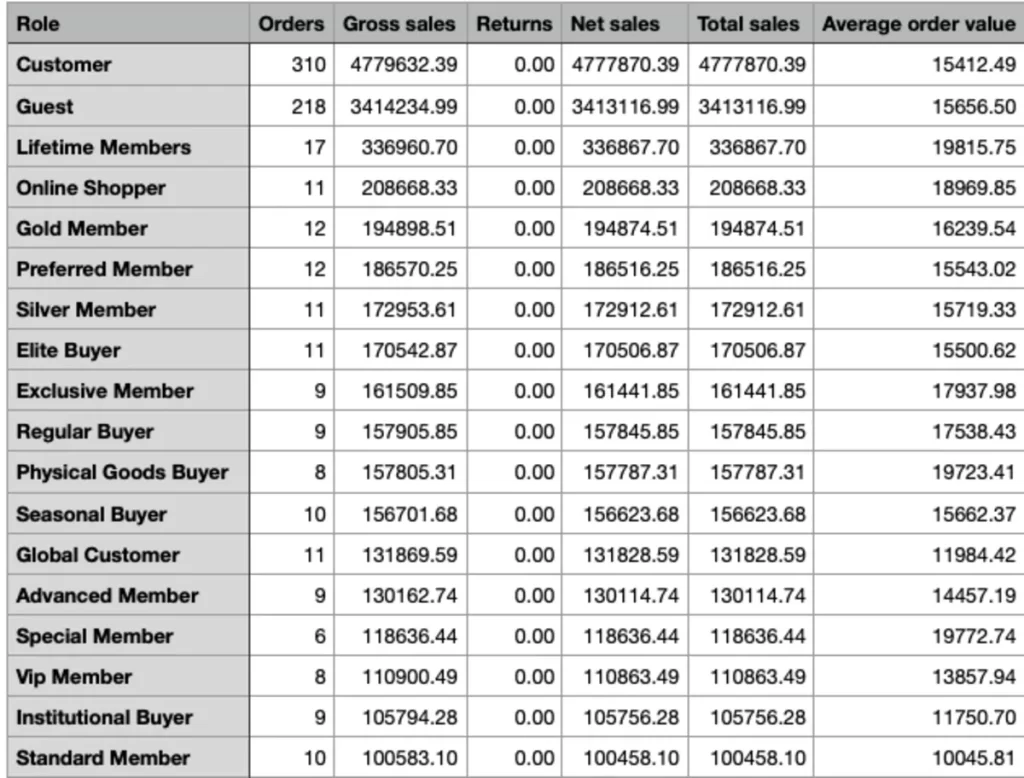
CSV Export Support
Export your data for further analysis or sharing Download user role–based sales reports in CSV format. Works for both the User Roles report page and the default WooCommerce Analytics pages with user role filters applied.
Final Thoughts
If you already use User Role Editor with WooCommerce, you’ve taken the important step of organizing your customers into meaningful groups. With Role-Based Analytics for WooCommerce, those groups become even more powerful—turning customer roles into actionable insights.
You’ll be able to clearly see:
- Which user roles contribute most to revenue.
- Which products different groups prefer.
- How promotions and coupons impact each customer type.
Together, User Role Editor and Role-Based Analytics give you the complete picture: organized customer groups backed by data you can act on.
Explore Role-Based Analytics for WooCommerce and discover how your customer groups drive growth.
FAQ
No. User Role Editor manages roles but doesn’t extend Analytics. To see performance data by User Role, you’ll need Role-Based Analytics for WooCommerce.
Install Role-Based Analytics for WooCommerce. It adds a dedicated User Roles report page and User Role filters across existing Analytics reports (Orders, Products, Categories, Coupons, Downloads).
Yes. The plugin lets you configure how to handle multi-role users, so you can decide how their sales data is attributed.
Yes. Role-Based Analytics introduces a special “Guest” User Role that automatically groups guest orders, so you can see how non-registered shoppers contribute to your store.
Role-Based Analytics is tested with WooCommerce 8.x+ and works smoothly with major extensions like Subscriptions and Memberships.
Yes. You can export CSV reports from both the dedicated User Roles page and the default Analytics reports with User Role filters applied.
No. There isn’t a free version. However, you can fully explore the plugin on its demo website before purchasing, so you know exactly how it works with your store setup.