Many WooCommerce store owners want to know how much revenue comes from Guest checkout versus Registered customers. A clear WooCommerce guest checkout report helps you measure which group drives sales and whether encouraging account creation is worth it.
What Are Guest and Registered Customers in WooCommerce?
- Guest Customers → Shoppers who complete checkout without creating an account. They don’t log in, so they remain anonymous in WooCommerce.
- Registered Customers → Shoppers who create an account and are automatically assigned to WooCommerce’s default Customer role.
Both groups are important:
- Guest checkout is fast and reduces friction (good for conversions).
- Customer accounts make it easier to build loyalty, run promotions, and increase lifetime value.
That’s why comparing guest checkout vs customer account WooCommerce data is crucial for store growth.
How to Analyze Guest vs Registered Customers sales report in WooCommerce
In this guide, we’ll use a plugin called Role Based Analytics for WooCommerce. Though this extension is built to extend WooCommerce Analytics with reporting for custom user roles (such as Wholesale, VIP, or B2B groups), it also includes a feature for comparing Guest checkouts with Registered customers.
- Guest → The plugin introduces a Guest role, which automatically groups all non-registered checkouts.
- Customer → WooCommerce assigns every registered buyer to the default Customer role, which appears inside Analytics.
This setup makes it possible to compare:
- Guest customers — one-time, anonymous checkouts.
- Registered customers — logged-in buyers tracked under the Customer role.
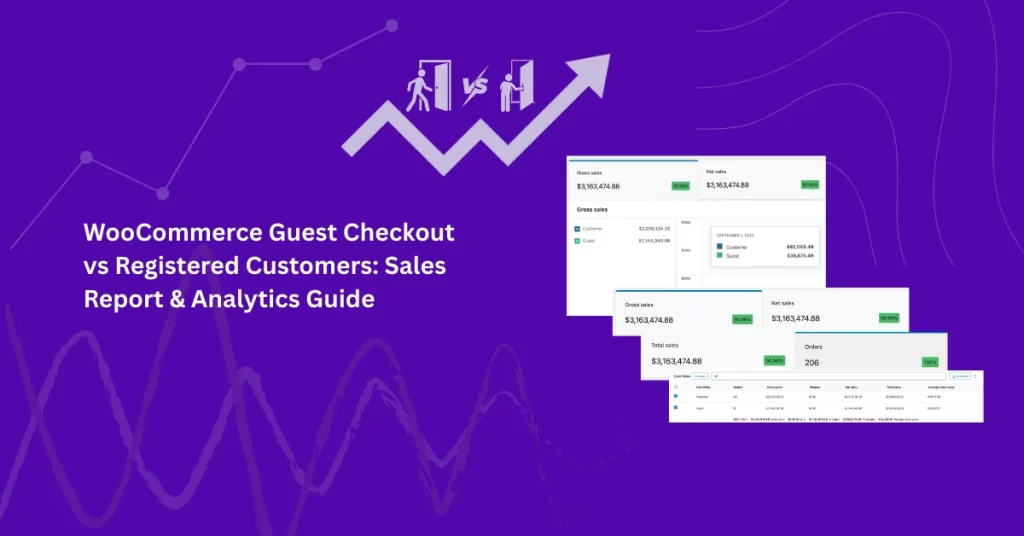
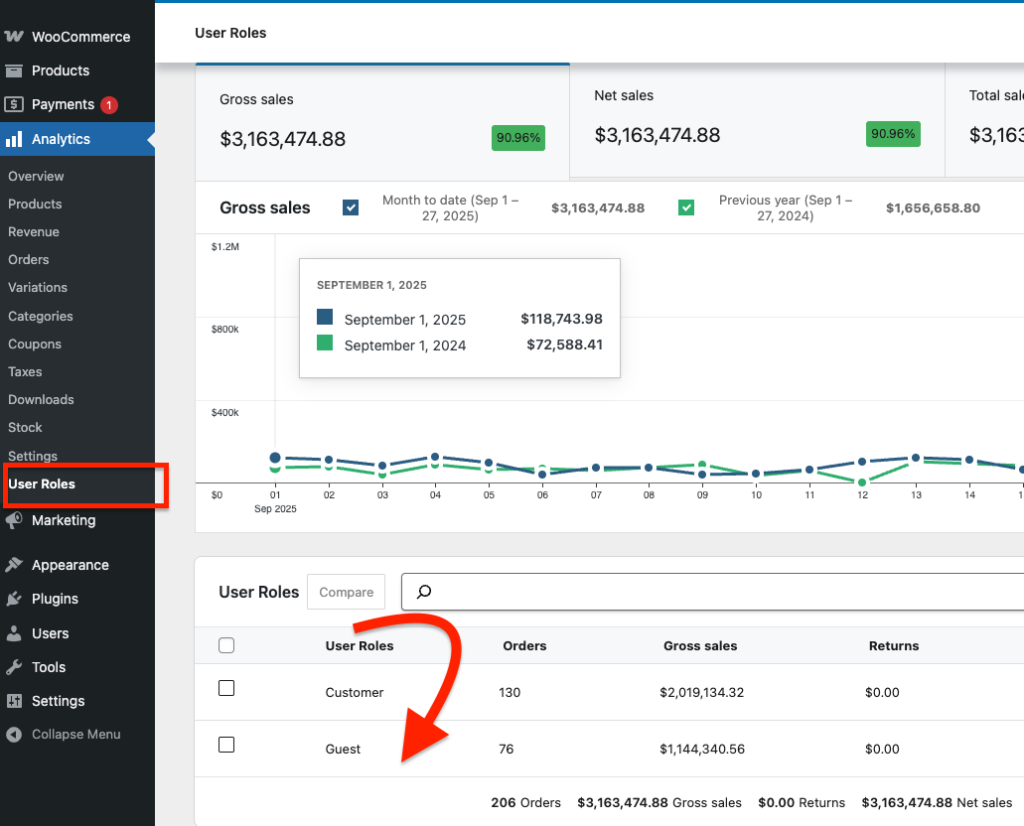
Inside the User Roles Analytics report page, both groups appear side by side. You can filter by date range, compare sales, and review performance metrics such as Orders, Gross Sales, Net Sales, Returns, and Average Order Value (AOV).
How to Compare Guest vs Registered Customers Sales report
After install and active Role based analytics for woocommerce extension Use this view any time you want a WooCommerce customer vs guest comparison. Dashboard → Analytics → User Roles What you’ll see: performance cards, a trend chart, and a table listing Guest and Customer roles with metrics like Orders, Gross Sales, Net Sales, Total Sales, Average Order Value (AOV).
You can check our article How to filter woocommerce sales report by user roles you will see full potential of this extension. Here we just describe how can you check your customer vs guest sales report incase you don’t manage the custom user roles and assign the customer.
Choose a Date Range
The date selector lets you run a precise WooCommerce guest checkout report for any period.
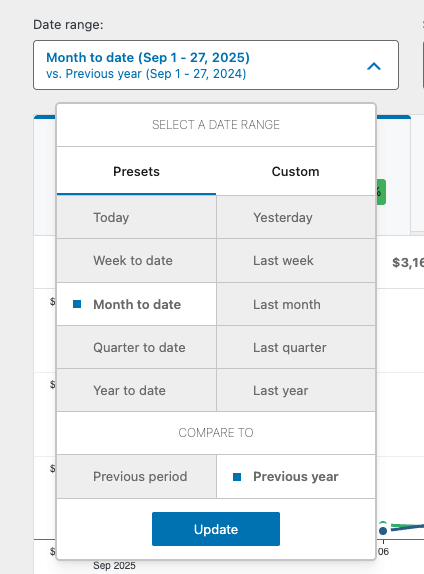
- Pick a preset (Today, Week to date, Month to date, Quarter to date, Year to date) or switch to Custom to set start/end dates.
- Under Compare to, choose Previous period or Previous year to benchmark Guests vs Registered customers over time.
- Click Update to refresh the charts and table.
Select Guest and Customer roles, then compare
Now run the Guest checkout vs Customer account WooCommerce analysis:
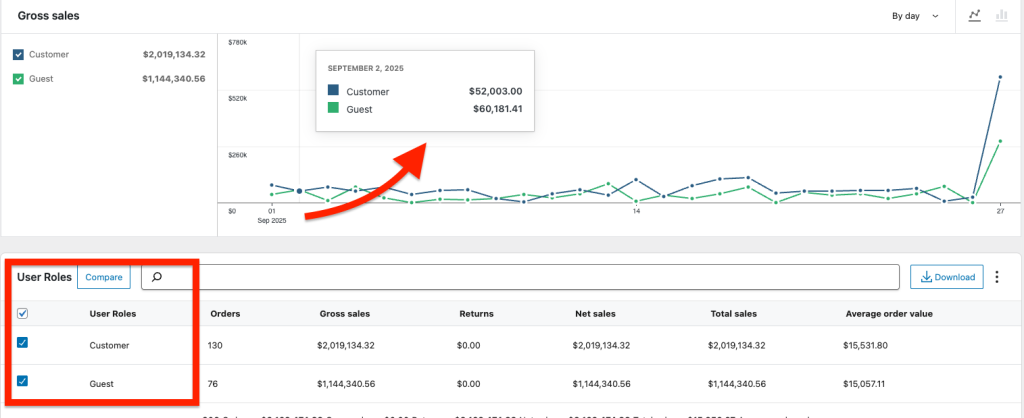
- In the User Roles table, tick Customer and Guest.
- Click Compare to chart them side-by-side.
- Hover the chart for daily values; scan the table to review Orders, Gross Sales, Returns, Net Sales, Total Sales, AOV.
- Use Download → CSV if you want to share or analyze the data elsewhere.
Review the Report
See performance cards, charts, and sortable tables showing:
Orders
Gross Sales
Net Sales
Returns
Average Order Value (AOV)
Export Data (Optional)
Export your Guest vs Registered report to CSV for deeper analysis in Excel, Google Sheets, or ERP tools.
You can also check full demo here. You will though this demo come with added few Custom roles as it serve bigger purpose but we will still see the Customer and guest along with other user role.
What Insights Can You Gain?
By comparing WooCommerce registered customer analytics with guest data, you can answer:
- Which group contributes more sales?
- Do Guests buy lower-value items, while Customers spend more per order?
- Which group uses coupons or discounts more often?
- Are certain products or categories more popular with Guests vs Customers?
This transforms raw sales into actionable insights.
Conclusion
Understanding the balance between guest checkout vs customer accounts in WooCommerce is critical for growth. Guest checkout may win short-term conversions, but registered customers often drive higher order values and repeat purchases.
With the Role-Based Analytics for WooCommerce plugin, you can:
- Compare Guests vs Customers side by side.
- Analyze sales performance across roles.
- Make data-driven decisions about checkout strategy and marketing.
👉Combine the ease of Guest checkout with incentives for registration — and use analytics to see which strategy delivers the most value.
Frequently Asked Questions
No. WooCommerce’s built-in reports don’t separate Guests and Customers clearly.
It automatically groups all non-registered checkouts into a Guest role.
Yes. The User Roles report lets you compare Guest, Customer, and any custom roles side by side.
Yes. Role-Based Analytics introduces a Guest role, so you can measure unregistered buyers alongside wholesalers and registered customers.
Yes. CSV export is available for the User Roles report and all role-filtered Analytics pages.